
US Calendar1.6.2 - Google Play
You'll be able to see results in few seconds.
Publisher Description

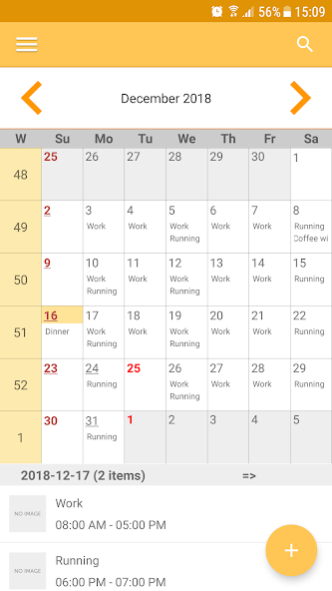
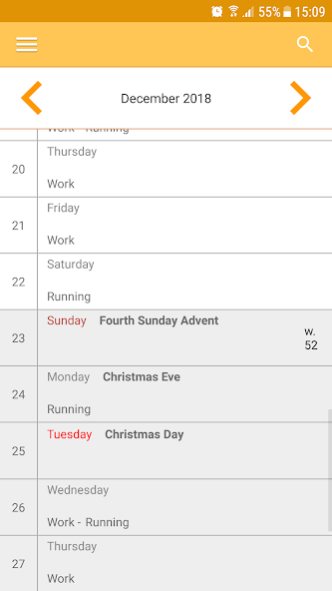

US Calendar is the app that helps you in your daily life. If you need help remembering what to do, then the app is perfect for you. The app is simple, helpful and personal.
The app makes it possible for you to associate an event with a picture and by that allowing you to express the information in a completely different way. There is a saying that
goes: a picture is worth a thousand words. A picture makes it easier to understand something and can be used advantageously by people who have difficulty to interpret information, for example people with Aspergers. Also, a picture is always more enjoyable to look at. Why not show a picture of your friend, when it´s time to meet him or her for a cup of coffee. Or a picture of your children when it´s time to pick them up from daycare.
In the app you can:
+ create/change/delete events
+ set start time/end time for an event
+ set reminder for an event
+ associate an event with a picture or color
+ create different types of events (single, daily, weekly, monthly och yearly)
+ override a special day for a recurrent event
+ create and load event templates to quickly create events
+ quickly jump to any day, month or year
+ delete future events for a recurrent event or end single event
+ take picture with your camera or choose one from gallery, when associating an event with a picture
+ choose between different views
+ read week numbers
+ import and export events
+ synchronize with external calendars (Samsung calendar, Google calendar) when installing app
About US Calendar
The company that develops US Calendar is Arne Nerén. The latest version released by its developer is 1.6.2.
To install US Calendar on your Android device, just click the green Continue To App button above to start the installation process. The app is listed on our website since 2024-01-14 and was downloaded 0 times. We have already checked if the download link is safe, however for your own protection we recommend that you scan the downloaded app with your antivirus. Your antivirus may detect the US Calendar as malware as malware if the download link to com.nerenaapps.us.calendar is broken.
How to install US Calendar on your Android device:
- Click on the Continue To App button on our website. This will redirect you to Google Play.
- Once the US Calendar is shown in the Google Play listing of your Android device, you can start its download and installation. Tap on the Install button located below the search bar and to the right of the app icon.
- A pop-up window with the permissions required by US Calendar will be shown. Click on Accept to continue the process.
- US Calendar will be downloaded onto your device, displaying a progress. Once the download completes, the installation will start and you'll get a notification after the installation is finished.
Program Details
System requirements
Download information
Pricing
Version History
version 1.6.2
posted on 2024-01-14
Have made changes to comply with Google policy, and also fixed a bug.
version 1.6.1
posted on 2023-10-14
Have updated the payment solution to comply with google demands
version 1.6.0
posted on 2023-08-10
Have updated to comply with google policy
version 1.5.9
posted on 2023-07-03
Have updated to comply with google demands
version 1.5.8
posted on 2023-04-09
Minor improvements
version 1.5.7
posted on 2023-01-29
Have changed payment model! Now you get the premium version for lifetime by making a single purchase. Enjoy :-)
version 1.5.0
posted on 2022-01-04
Fixed a bug that prevented notifications from appearing in Android 8.0 and later
version 1.4.9
posted on 2021-10-30
Minor fix
version 1.4.7
posted on 2021-09-25
Minor fixes
version 1.4.6
posted on 2021-09-24
Now you only pay a single amount to get access to the premium version
Disclaimer
Official Google Play Link
We do not host US Calendar on our servers. We did not scan it for viruses, adware, spyware or other type of malware. This app is hosted by Google and passed their terms and conditions to be listed there. We recommend caution when installing it.
The Google Play link for US Calendar is provided to you by apps112.com without any warranties, representations or guarantees of any kind, so access it at your own risk.
If you have questions regarding this particular app contact the publisher directly. For questions about the functionalities of apps112.com contact us.
